Chrome extension for dev teams
Same page. Different environment. One click.
ENV Portal takes the page you are looking at and gives you the same page on every other environment of the same app — plus the ticket it belongs to. No retyping, no typos, no bookmarks folder.
Free, with no account needed.
Editing it by hand
or press the ENV Portal button once
One click opens this
How it works
Be honest — you edit the hostname by hand.
Cursor into the address bar, select the subdomain, retype it, hope you got the path right. Every day. Describe your environments once and the extension does the rewrite instead.
Describe the environments once
Live, preview, editorial, branch deployments, cache invalidation endpoints, API responses — anything you can write as a URL.
Press the button on any page
The extension reads the address you are on, matches it against the workspace, and lists every counterpart.
Land on the same page, elsewhere
Path and query survive the jump. So does the ticket the page belongs to.
The product demo needs JavaScript to play.
What you get out of it
Navigate faster
Switch between environments with one click instead of a hand-edited URL.
No more copy-paste
No copying, typing, or pasting URLs by hand. Just click and you are there.
Reach the ticket too
Instant access to any environment, API response, or the ticket the page belongs to.
One setup per project
Define each project as a workspace, share it with colleagues, keep it in version control.
Variables
Some links need a number the address never had.
A ticket. A merge request. A build. Swapping a hostname is arithmetic — this part is not. A variable is a named value your workspace declares, and a slot the link leaves open for it.
It is what gets you from a Jira ticket, or a GitLab merge request, straight to the branch deployment that belongs to it.
The template you write once
company.atlassian.net/browse/PROJ-{{ticketNumber}}
The link you get
company.atlassian.net/browse/PROJ-42395
Read off the merge request — nobody typed 42395
Four places it looks, in this order
The address you are on
Always wins. An address cannot be out of date.
The page in front of you
A merge request number lives in Jira's development panel — nowhere in the ticket's address, and not rendered until you hover it. ENV Portal hovers it and reads it, and only trusts a panel that names the ticket you are actually on. On a board of forty cards, a careless read sends you to someone else's deployment. If two values disagree, it takes neither.
You type it
A labelled box in the popup. Paste a whole URL or type just the number.
Memory
The last value it found, kept on your machine and tied to the ticket it came from.
The first source that answers wins, and the rest are never asked — which is why a fresh reading always beats a remembered one.
No half-built links
A link it cannot complete is left out of the list, never shown with a hole in it.
One tab, one click, nothing sent
Reading the page happens on that tab only, on the click that opened the popup, and where the workspace says to look. Nothing leaves your browser.
Workspaces
A workspace is just JSON.
Which means you can review it, commit it next to the project it describes, and hand the whole team the same setup instead of everyone building their own bookmarks.
Would you rather have an assistant write it?
The same rules exist as a specification, with a button that copies the whole thing. Paste it into Claude, ChatGPT or Copilot with two or three real addresses from your project and it writes the workspace for you.
{
    "workspaceName": "My Test Workspace",
    "ticketPrefix": "TICKET-",
    "environments": [
      {
        "name": "Dev",
        "links": [
          {
            "name": "Dev Page",
            "url": "https://www.dev.my-company.com/{{language}}/{{path}}",
            "defaultLanguage": "en-us"
          }
        ]
      },
      {
        "name": "Branch Deployment",
        "links": [
          {
            "name": "Branch Deployment",
            "url": "https://www.dev-TICKET-{{ticketNumber}}.my-company.com/{{language}}/{{path}}"
          }
        ]
      }
    ]
  }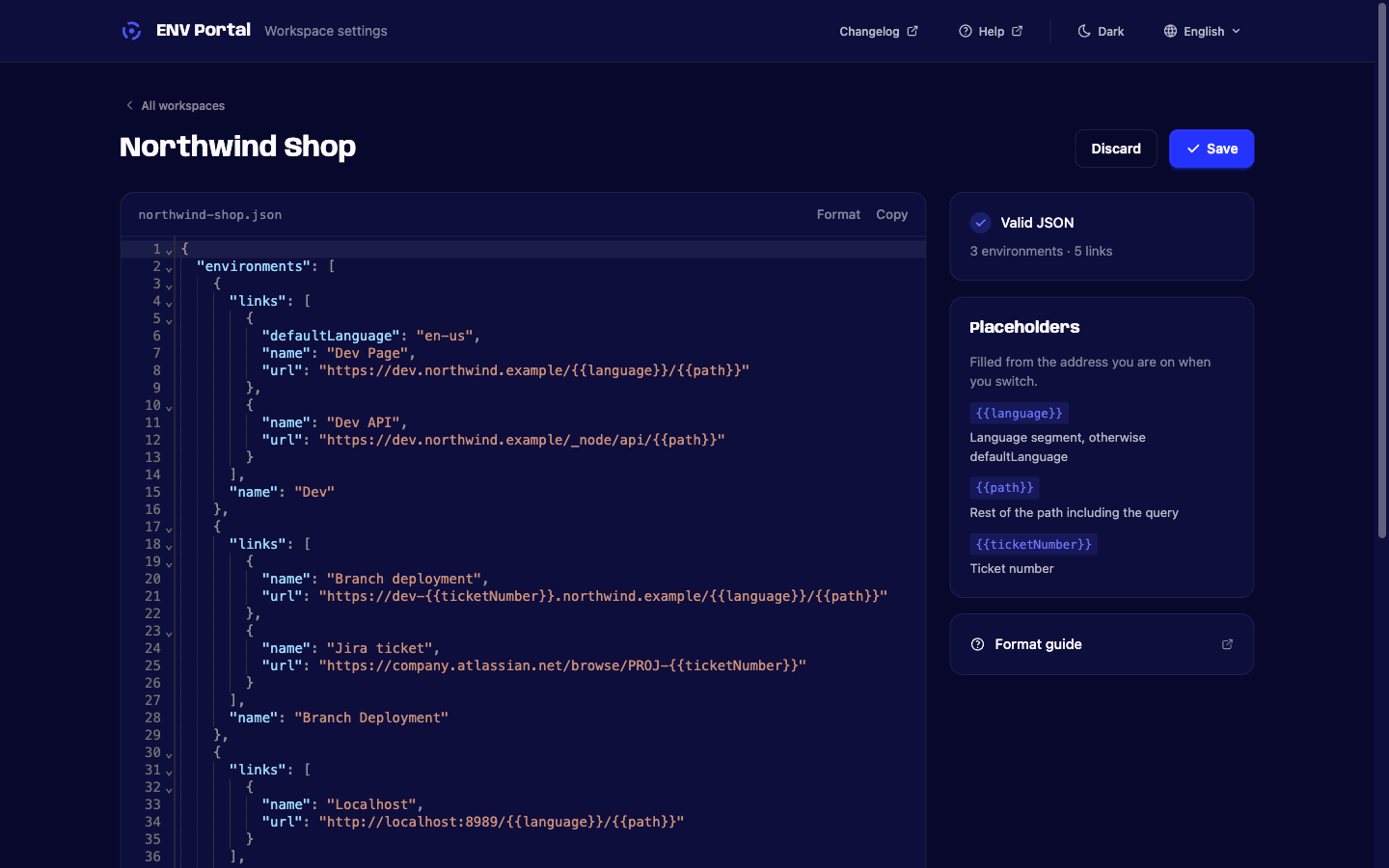
Workspaces are edited in a real JSON editor and validated before they save.
Cost
Free, and there is no catch to go looking for.
Every environment link, the ticket cross-links, sync between your machines, and as many workspaces as you care to write. No account, no card, nothing to cancel later.
Add to ChromeQuestions
storage, activeTab and scripting, and holds no host permissions. It reads the address of the tab you press the button on, at the moment you press it, and nothing leaves your browser.
Stop editing the address bar.
Free, with no account needed.